
Written by: Ali-Reza Adl-Tabatabai, Founder and CEO, Gitar
Key Takeaways
- Replit vibe coding helps teams build MVPs in a single day using natural language prompts, real-time multiplayer editing, and Agent v3 self-testing.
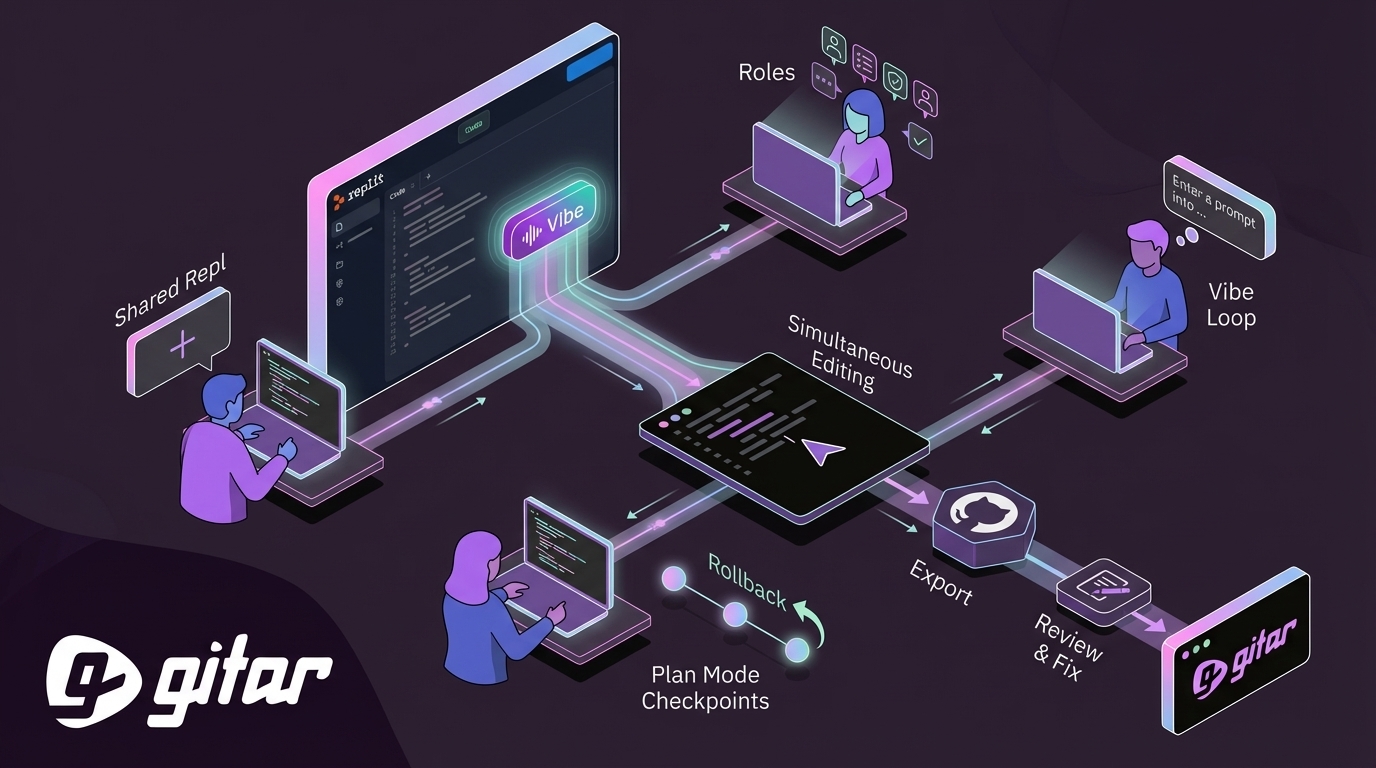
- Use a 7-step workflow: create a shared Repl, assign roles, run the vibe loop, add Plan Mode checkpoints, use rollback history, export to GitHub, then complete a final review.
- Rely on multiplayer cursors, automatic checkpoints, and time travel history to reduce merge conflicts and keep collaborative sessions productive.
- AI-generated code increases defects by 7-15% and PR review time by 91%, so pair Replit with automated tools that catch bugs, security issues, and failing builds.
- Turn prototypes into production-ready code faster by integrating Gitar’s healing engine for automatic fixes and guaranteed green builds.
Replit Vibe Coding 101 for Teams
Vibe coding turns natural language prompts into functional applications with help from AI. Replit’s 2025 review explains how the platform became Agent-first, shipping Agent v3 in September with self-testing capabilities, up to 200 minutes of autonomous work, and the ability to build other agents.
Key collaborative features include:
- Checkpoints: Automatic Git-like saves with time travel navigation
- Multiplayer cursors: Real-time simultaneous editing similar to Google Docs
- Plan Mode: Structured sessions with proactive checkpoint creation, launched in October 2025
- Agent v3: Self-testing AI that validates code in real browsers
Now that you have a handle on Replit’s collaborative capabilities, you can apply them in a structured team workflow.
7-Step Workflow for Collaborative Replit Vibe Coding
Use this step-by-step workflow to build collaborative MVPs while avoiding merge conflicts and AI hallucinations.
1. Create a Shared Repl and Invite Your Team
Start a new Repl and invite team members by email or shareable link. Teams plans added bulk invites and enhanced privacy settings in April 2025, including role-based access control for larger organizations.
2. Assign Clear Roles for Each Contributor
Assign three core responsibilities so every collaborator knows what to focus on. The Prompter writes natural language instructions that guide the AI. The Reviewer tests generated functionality and gives feedback for improvements. The Tester validates edge cases and user flows to confirm that the code works beyond happy-path scenarios. This structure reduces confusion and keeps each iteration moving forward.
3. Start the Vibe Loop with a Strong Prompt
Begin with clear, specific prompts that describe the stack and core features. For the fitness tracker example, you might say: “Build an async API for fitness tracking using Node.js and Express. Include endpoints for user registration, workout logging, and progress analytics.” The AI then generates structured code within minutes.
4. Use Simultaneous Editing with Plan Mode Checkpoints
Let multiple team members edit at the same time using multiplayer cursors. Plan Mode adds automatic checkpoints during collaborative sessions, which protects work during complex iterations and makes it easier to coordinate changes.
5. Use Rollback History When AI Breaks Things
Replit introduced checkpoint previews and time travel features in May 2025, so teams can move through project history without losing context. Use this history view when AI iterations break existing functionality or introduce regressions.
6. Export Your Project to GitHub
Export the completed project to GitHub for version control and CI/CD integration. This step preserves code ownership and connects your Replit work to production deployment workflows.
7. Review and Fix Bugs Before Production
Run thorough tests and add two or three more prompts to cover edge cases. AI-generated code often needs human oversight at this stage to reach production quality.
Vibe Coding in Action: Build a Team Fitness Tracker in 1 Hour
This example shows how a three-person team built a functional fitness tracker using collaborative vibe coding.
Initial Prompt from the Prompter: “Create a fitness tracking app with user authentication, workout logging, and a progress dashboard. Use a React frontend with a Node.js backend and SQLite database.”
Collaborative Refinement: While the AI generated the base structure, team members added features in parallel.
- The Reviewer added social sharing functionality
- The Tester implemented data validation and error handling
- The Prompter refined the dashboard with charts and analytics
The multiplayer editing environment supported real-time collaboration without merge conflicts. RevOps teams report similar success, building custom tools that save about 90% of the time spent on processes like lead processing.
The team still hit AI hallucinations in the authentication logic, which is common when AI-generated code ships with missing or misconfigured authentication. This pattern shows why teams benefit from automated code review tools that catch security vulnerabilities before release.
Is Replit Good for Collaboration? Pros and Cons
|
Aspect |
Pros |
Cons |
|
Real-time Editing |
Multi-cursor support and automatic checkpoints with Agent v3 |
|
|
AI-Native Development |
Natural language prompts and Plan Mode structure |
Higher defect rates from AI code |
|
Scaling |
GitHub export, Teams RBAC, and enterprise features |
The main limitation comes from AI-generated bugs that slip through collaborative review, which contributes to the 91% increase in PR review time mentioned earlier. Teams reduce this risk by adding automated checks that catch these issues before deployment.

How to Collaborate on Replit Without Chaos
Structured workflows and automated quality controls keep collaborative vibe coding sessions organized.
Best Practices:
- Write clear, specific prompts with a defined scope
- Run the vibe loop as a cycle of prompt, generate, test, and iterate
- Limit simultaneous complex changes to avoid AI overload
- Follow Fyresite’s workflow: Idea, AI Generation, Iteration, Testing, and Deployment
Common Pitfalls:
- AI hallucinations that create security vulnerabilities
- Merge conflicts from overlapping complex edits
- Insufficient testing of AI-generated edge cases
Pairing Replit with Gitar’s automated code review addresses these gaps. Tools like CodeRabbit provide suggestions, while Gitar applies fixes directly and keeps builds green.

|
Capability |
Manual/CodeRabbit |
Gitar |
|
PR Feedback |
Requires manual implementation |
Applies changes automatically |
|
CI Failures |
Requires manual debugging and fixes |
Analyzes and fixes failures automatically |
|
Green Builds |
No guarantee |
Guaranteed through the healing engine |
|
Team Cost |
$15-30 per developer |
14-day Team Plan trial with no seat limits |
Install Gitar to catch AI-generated bugs before they reach production.
Pro Tip: Use Gitar for Production-Ready Vibe Projects
After you export your Replit project to GitHub, install the Gitar App in about 30 seconds to turn AI-generated prototypes into production-ready code. Gitar’s healing engine then:

- Analyzes CI failures and generates validated fixes
- Implements reviewer feedback without extra manual work
- Provides a consolidated dashboard instead of scattered notifications
- Delivers guaranteed green builds through automated testing
Here is what a three-person team can expect.
|
Metric |
Without Gitar |
With Gitar |
|
PR Review Time |
91% higher than baseline |
Significant reduction |
|
AI-Generated Defects |
The 7-15% increase mentioned earlier |
Healed automatically before merge |
|
Context Switching |
Multiple interruptions each day |
Near-zero interruptions |
|
Monthly Tool Cost |
$45-90 for suggestion tools |
14-day Team Plan trial with no seat limits |
Start your 14-day Team Plan trial and see the difference automated healing makes.
FAQ
How do you collaborate with multiple people on Replit?
Start by creating a shared Repl and inviting team members by email or link. Then follow the 7-step workflow: assign roles for Prompter, Reviewer, and Tester, use multiplayer cursors for simultaneous editing, create checkpoints in Plan Mode, and export to GitHub for production deployment. Teams plans also support bulk invites and role-based access control for larger organizations.
What are Replit checkpoints and how do they work?
Checkpoints act as automatic Git-like saves that preserve project state during development. Introduced in May 2025, they let you move through project history without losing context. Plan Mode adds proactive checkpoints during collaborative sessions so teams can roll back when AI iterations break existing functionality.
Is Replit good for team collaboration?
Replit works well for rapid prototyping and MVP development, with real-time multiplayer editing, natural language AI generation, and integrated deployment. Teams still benefit from pairing it with automated code review tools like Gitar to catch AI-generated bugs and security vulnerabilities before production.
How do you effectively collaborate on Replit projects?
Use a structured workflow with clear role assignments and a consistent vibe loop of prompt, generate, test, and iterate. Rely on Plan Mode for automatic checkpoints, and avoid AI overload by limiting simultaneous complex changes. Export to GitHub for version control and connect automated quality tools to reach production readiness.
What are the main challenges with Replit collaborative vibe coding?
Teams often face sync delays between collaborators, AI hallucinations that create security vulnerabilities, version conflicts during simultaneous editing, and performance lag on large projects. These challenges stay manageable when you apply solid workflows and use automated code review tools that validate AI-generated output.